
Add MobiGyaan as a preferred source on Google
Google has announced a major expansion of Android Parental Controls with Android 17, introducing new tools designed to help parents manage screen time, app access, content restrictions, and overall digital wellbeing for children and teenagers. Originally introduced on Pixel devices, the feature will now be available across all Android smartphones and tablets that receive the Android 17 update.
Alongside the software update, Google has also increased its U.S. digital wellbeing fund to more than $50 million, reinforcing its commitment to promoting healthier technology habits and safer online experiences for younger users.

Android Parental Controls Expanding Across Android 17 Devices
With Android 17, Google is integrating Parental Controls directly into the device settings menu, creating a centralized hub where parents can access built-in device management tools alongside Google Family Link features.
The controls are protected through a dedicated PIN system, making it easier for parents to manage settings while preventing unauthorized changes by children.
According to Google, the new setup is designed to help families strike a healthier balance between screen usage and offline activities while providing convenient management tools in one place.
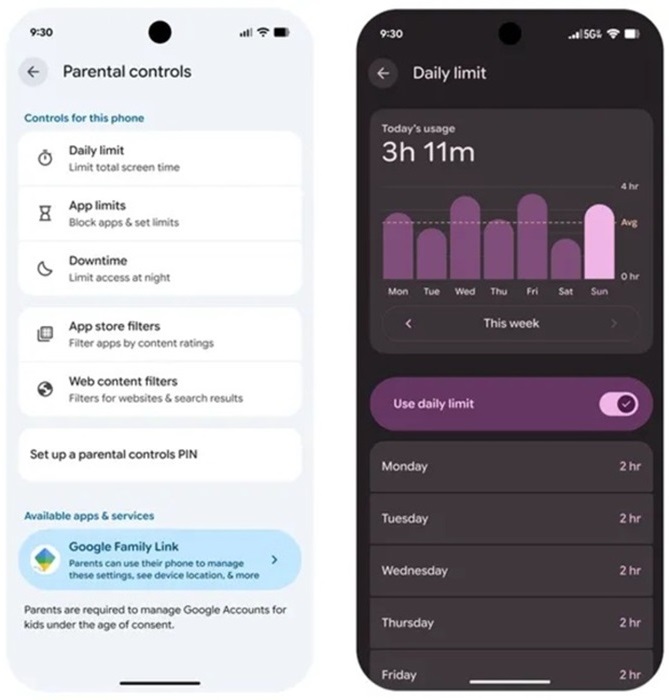
Key Android 17 Parental Control Features
Parents will be able to:
- Set Daily Screen Time Limits to control how long children can use their devices each day.
- Create Downtime Schedules that automatically lock devices during bedtime or study hours.
- Apply Google Play Content Filters to restrict downloads based on age-appropriate content ratings.
- Limit Usage of Specific Apps by setting individual app time limits.
- Block Apps Completely when required.
- Manage Family Controls Directly from Android Settings without navigating through multiple applications.
The system is designed to support healthy digital habits while giving parents greater visibility and control over device usage.
Family Link Integration
Android Parental Controls also provide direct access to Google Family Link, allowing parents to configure and manage advanced supervision tools from their own smartphones.
Through Family Link, parents can access additional features such as:
- School Time Mode for minimizing distractions during learning hours.
- Google Play Purchase Approvals before app downloads or purchases.
- Location Alerts and Tracking Features.
- Device Activity Monitoring.
- Additional Family Supervision Tools.
Google says the tighter integration simplifies family account management and improves accessibility for parents.
Google Expands Digital Wellbeing Investment
Alongside the Android 17 announcement, Google revealed that it is increasing its U.S. Digital Wellbeing Fund to over $50 million.
The expanded investment will support:
- Research into healthy technology usage habits.
- Programs focused on reducing social isolation among children and teenagers.
- Development of new digital wellbeing interventions.
- Initiatives that encourage healthier relationships with technology.
According to Google, the goal is to help build a healthier and more resilient generation of young users while promoting responsible digital engagement.

Availability
The new Android Parental Controls will roll out to smartphones and tablets receiving the Android 17 update. The feature will be accessible directly through Android Settings and will work alongside the existing Google Family Link ecosystem for expanded parental supervision capabilities.

