
Add MobiGyaan as a preferred source on Google
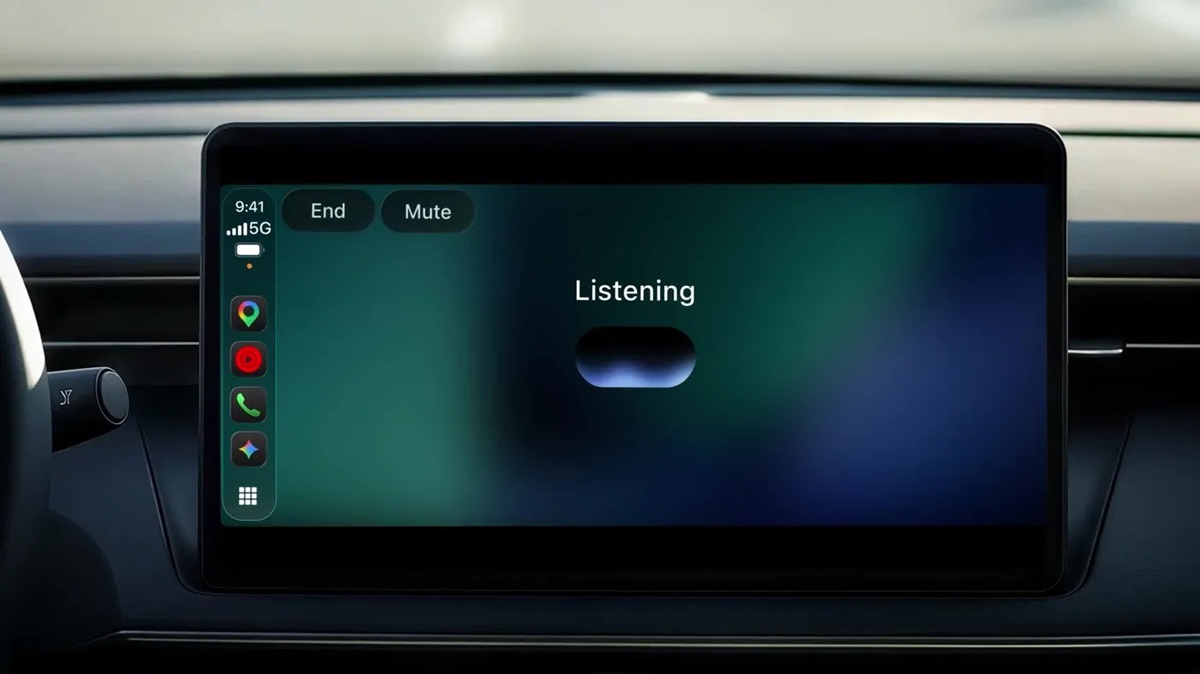
Google has started rolling out the Gemini app on Apple CarPlay, allowing iPhone users to have hands-free conversations with Gemini Live directly through their car’s infotainment display.
Following its availability on Android Auto and vehicles with Google built-in, the expansion brings Gemini’s conversational AI experience to Apple’s in-car platform. Users can tap the Gemini app icon on the CarPlay screen or side rail to start a new conversation or resume a recent one.
Gemini Live supports natural back-and-forth conversations, allowing users to interrupt the assistant, provide additional details, change topics or pause the conversation whenever they need to focus on driving.
What Can Users Do With Gemini On Apple CarPlay?
Google highlights several ways users can use Gemini during daily commutes and road trips.
Prepare for meetings
Users can ask Gemini about their daily schedules, upcoming appointments, and when they should leave for their next meeting. They can also discuss talking points before arriving.
Example prompts include:
- “What does my day look like?”
- “Help me prep for my 10 AM with the design team.”
Catch up on emails
Gemini can connect with Google Workspace services, including Gmail and Google Calendar, to help users manage their work while on the road.
Users can request a Daily Brief, check unread emails, summarise lengthy email threads and discuss replies through voice commands. The Daily Brief feature needs to be enabled beforehand.
Google notes that Daily Brief and certain other personalisation features are unavailable to users under 18 and those in the European Economic Area (EEA) and Nigeria.
Find nearby places
Users can ask Gemini for recommendations around their destination, including nearby lunch spots and other places to visit. The assistant can also provide information about the history of local landmarks.
Brainstorm Ideas & Learn New Topics
Gemini Live can also be used for brainstorming, presentation practice, and learning during a commute.
For example, users can ask Gemini to act as a skeptical vice president and challenge a business strategy, rehearse a presentation or explain technical topics such as how solid-state EV batteries work.
Conversations Sync With The Gemini App On iPhone
Conversations started through Apple CarPlay automatically sync with the Gemini app on the connected iPhone.
Once users have parked, they can access conversation history, including summaries, notes, and brainstorming sessions, through the Gemini app. This allows them to continue working with information discussed during the drive.
Gemini Live on Apple CarPlay: Availability & How To Get Started
Google has started rolling out Gemini on Apple CarPlay globally from November 12, 2026. The feature is available to Gemini users on iOS across all supported Gemini Live languages.
To get started, users need to:
- Update the Gemini app to its latest version on their iPhone.
- Enable microphone permissions for the app.
- Use Gemini Live on their iPhone at least once.
- Connect the iPhone to a compatible car with Apple CarPlay.
- Tap the Gemini icon on the CarPlay display to start a new conversation or resume a recent one.
With this rollout, Google is bringing Gemini Live’s conversational capabilities to Apple CarPlay, allowing iPhone users to access the AI assistant through voice while keeping their attention on the road.

