

Add MobiGyaan as a preferred source on GoogleWhatsApp has introduced four new features for group chats, making it easier for users to manage conversations, share updates, and keep track of important messages. The new additions include permanent message pinning, the ability to share recent message history with existing group members, group status updates, and unread chat filters for mentions and replies.
The updates aim to improve group communication and help users stay informed in busy conversations involving family, friends, and communities.
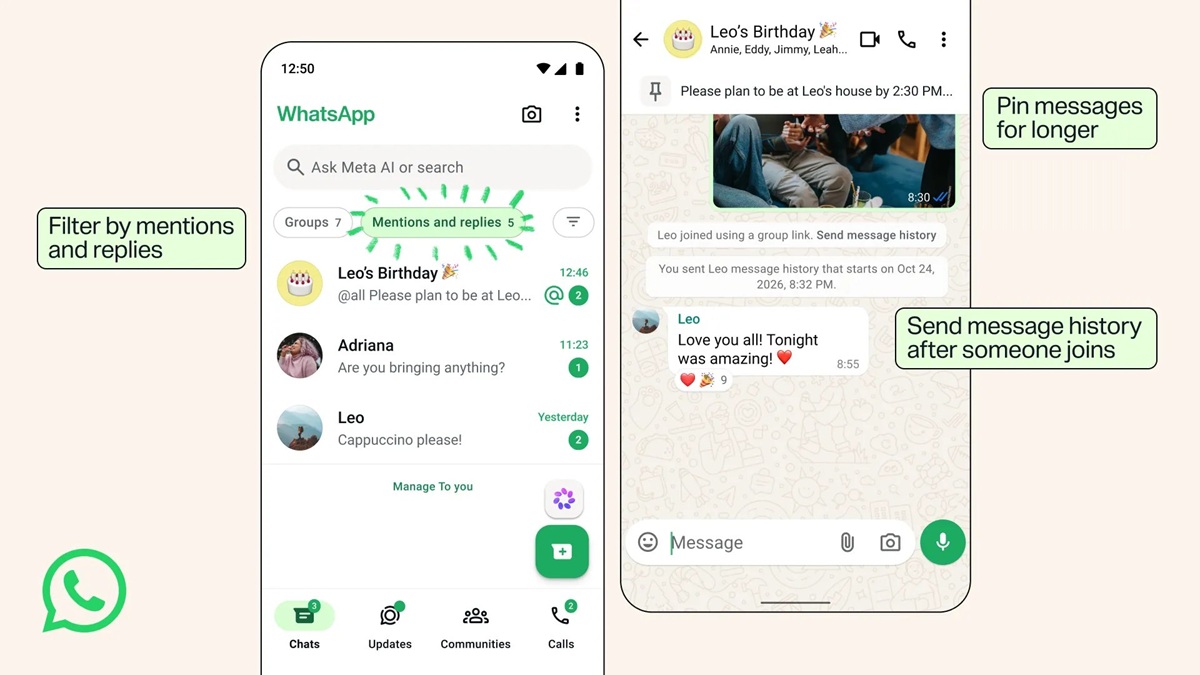
WhatsApp Group Chats Get Four New Features
1. Pin Messages Indefinitely
WhatsApp now allows users to pin important messages in group chats without selecting a predefined time limit. Previously, pinned messages were subject to time-based options. With this update, users can keep important information, such as event details, announcements, and instructions, accessible at the top of the conversation indefinitely.
2. Share Message History After Someone Joins
WhatsApp is expanding its message history-sharing feature. Previously, users could choose to share recent message history with new members while adding them to a group.
With the latest update, administrators and group members can also share recent messages retroactively after someone has already joined. Users can do this by tapping the new member’s name in the group chat.
WhatsApp says these shared messages remain protected by end-to-end encryption, just like regular personal and group conversations.
3. Share Status Updates Within Groups
WhatsApp is introducing group status updates, allowing members to share updates with specific groups, such as family groups, running clubs, or other communities.
Everyone in the group can view and react to these updates, as well as share their own status updates within the group. Like regular WhatsApp Status updates, group statuses disappear automatically after 24 hours.
4. Filter Unread Chats by Mentions and Replies
WhatsApp is also adding a new chat filter to help users find unread group conversations where they have been specifically mentioned or received a direct reply.
The filter includes conversations involving direct mentions, replies, and @all messages, making it easier to identify discussions that require their attention without going through every unread message.
WhatsApp Highlights Existing Group Chat Features
Alongside the new additions, WhatsApp has highlighted several existing group chat features designed to improve communication and organization.
These include private replies, which allow users to respond privately to individual group members, and polls with an option to restrict participants to a single answer by disabling the ‘Allow multiple answers’ setting.
WhatsApp also offers member tags, allowing users to identify their roles or relationships within a group. For example, members can use labels such as ‘Sam’s Dad’ or ‘Treasurer’ to provide additional context to other participants.
Availability
WhatsApp says the new group chat features will roll out to users through an app update. However, the company has not specified an exact rollout timeline, and availability may vary across devices and users.