

Add MobiGyaan as a preferred source on Google
WhatsApp has finally started rolling out its long-requested Scheduled Messages feature, allowing users to schedule text messages and media for delivery at a specific date and time. The new functionality works across individual conversations and group chats, allowing users to plan messages in advance without relying on third-party applications or reminders. The feature supports scheduling messages up to two weeks in advance, with automatic delivery even when the sender is offline. Other highlights include support for links, photos, and videos, a dedicated section to manage scheduled messages, and end-to-end encryption.

WhatsApp Scheduled Messages Feature | Schedule Texts & Media Up to 2 Weeks Ahead
WhatsApp had been testing the message scheduling functionality with select beta users on Android and iOS for some time. The feature was officially teased through the company’s X account on 25th November 2026, before its rollout was announced.
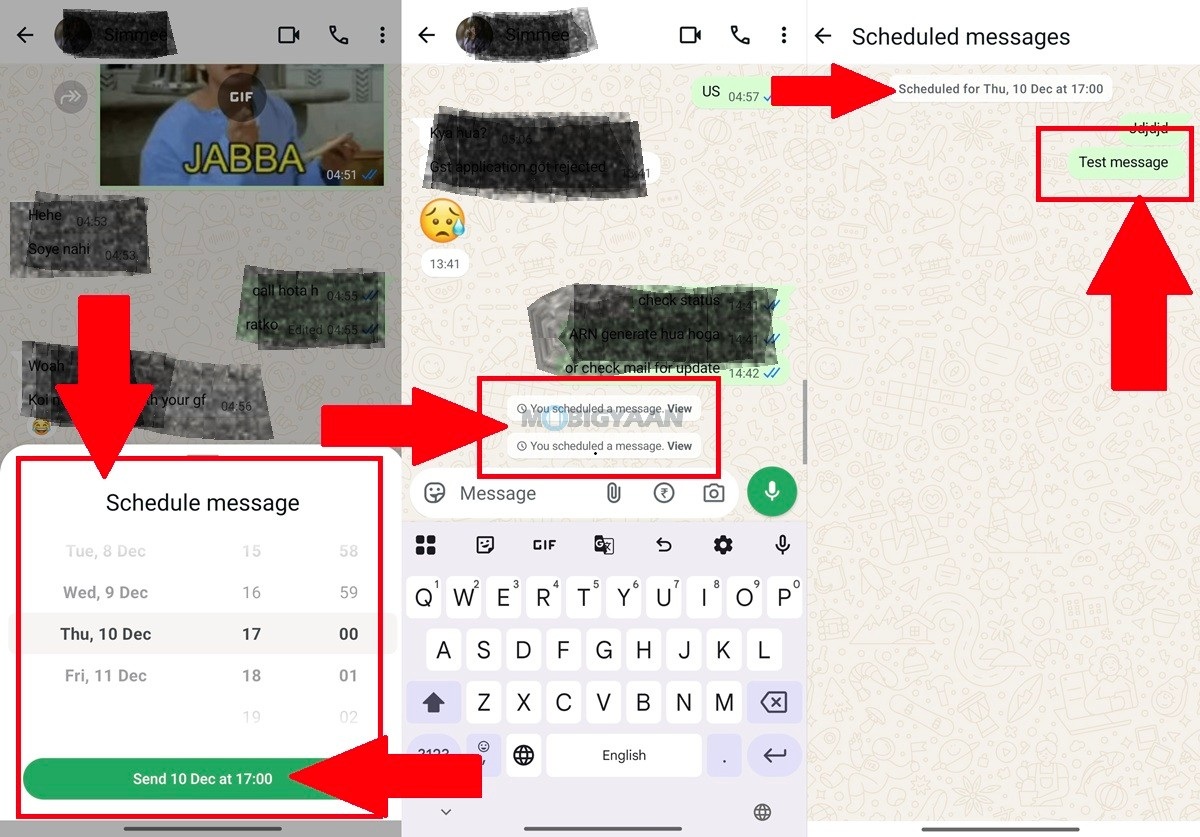
With the new feature, users can compose a message and select the date and time at which they want it delivered. To schedule a message, users need to open an individual or group conversation, type their message or attach media, and then long-press the send button. This brings up an option to select a scheduled delivery date and time.
The available scheduling window ranges from 10 minutes to two weeks ahead, allowing users to prepare messages for upcoming events, reminders, and other occasions.
Support for Text, Links, Photos & Videos | End-to-End Encryption
WhatsApp’s Scheduled Messages feature supports text messages, links, photos, and videos. However, the functionality does not appear to support documents at present.
All scheduled messages remain protected by WhatsApp’s end-to-end encryption. Once users select a delivery time, the message is automatically sent when the scheduled time arrives. The sender does not need to keep WhatsApp open or maintain an internet connection on their phone at the time of delivery.
This allows users to plan messages in advance without having to manually send them at the selected time.
Manage & Delete Scheduled Messages Before Delivery
WhatsApp also provides an option to review scheduled messages before they are delivered. A dedicated section in the chat information screen displays pending scheduled messages, allowing users to check and delete them if their plans change.
Users can delete a scheduled message before its delivery without notifying the recipient, as the message has not yet been delivered to the conversation.
The feature also has a specific behaviour in group chats. When a user schedules a message in a group, it will only be delivered to members who were part of that group when the message was originally scheduled. Members who join the group later will not receive the previously scheduled message.
WhatsApp Scheduled Messages Availability
According to Gadgets 360, the Scheduled Messages feature has been verified to be working for some users, although it is not yet available to everyone.
WhatsApp appears to be enabling the functionality through a phased rollout. Users who cannot find the scheduling option may have to wait until it becomes available on their accounts. The feature supports both individual conversations and group chats, with availability reported across WhatsApp’s Android and iOS platforms.
WhatsApp is also working on View-Once Text Messages for iOS with screenshot protection.