
Spotify is expanding the social side of its app by introducing two new features within Messages: Listening Activity and Request to Jam. Built on top of Spotify’s in-app messaging system, these additions make it easier for users to discover what their friends are listening to and instantly turn those moments into shared listening sessions.
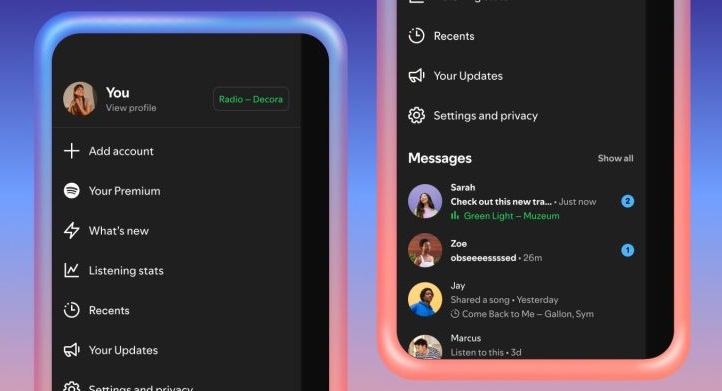
According to Spotify, the new features are designed to help users feel more connected through music, whether it’s casually checking what a friend is playing or jumping into a live Jam together.
Listening Activity is an opt-in feature that allows users to share what they are currently listening to in real time within Spotify Messages. Once enabled, a user’s listening activity appears:
- In the chat row of the side drawer
- At the top of individual Messages chats
Spotify notes that listening activity is only shared with people you’ve already messaged on the platform, keeping the feature more private and controlled.
How to Enable or Disable Listening Activity on Spotify
- Open the side drawer menu in Spotify
- Tap View profile
- Go to Privacy and social settings
- Enable or disable Listening Activity
Users can also manage who can view their listening activity if the feature is turned on.
Spotify is also adding Request to Jam, a feature that lets users quickly start a shared listening session directly from Messages. If you see a friend actively listening to a song, you can send a Jam request. Once accepted, the friend becomes the host of the Jam session, and both participants can add songs to a shared queue and listen together in real time.
How to Start a Jam Session on Spotify
- Open the Messages chat of a friend who’s listening to music
- Tap Jam in the top-right corner to send a request
- Your friend can accept or decline the request
- If accepted, both users can listen together and add tracks to the queue
Note: You need a Spotify Premium subscription to request a Jam. Free users can still join a Jam session when invited by a Premium user
The new Listening Activity and Request to Jam features are now rolling out in Messages-enabled markets, including India, on both Android and iOS. Spotify says the features will be widely available by early February.
- Listening Activity is available to all users with access to Messages
- Request to Jam requires Premium to initiate, but Free users can join when invited
- Since both features are part of Messages, they’re available to users aged 16 and above

