
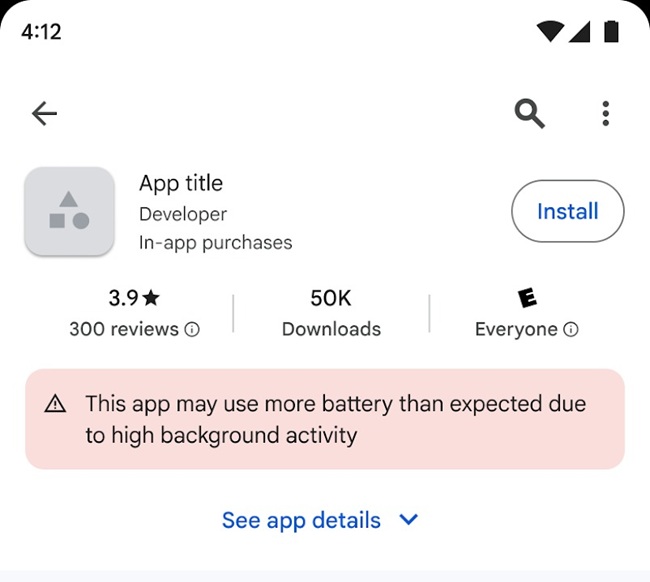
Google has introduced a new system on the Google Play Store that warns users about apps that consume excessive battery power. The company is rolling out a new “Excessive Partial Wake Lock” metric to help developers identify background processes that drain battery life.

The feature was developed in collaboration with Samsung and was refined through developer feedback during its beta phase last year. It is now officially available to all developers via Android Vitals, providing detailed insights into how apps use wake locks during user sessions.
Google has also started enforcing wake lock technical quality standards to improve battery efficiency on Android devices.
Apps that exceed the Excessive Partial Wake Lock threshold may face several consequences on the Play Store, including:
- Warnings displayed on the Play Store listing
- Reduced visibility in discovery features such as recommendations
- Inclusion in Android Vitals performance metrics alongside crashes and ANRs (App Not Responding errors)
This move is intended to push developers to optimize background processes and prevent unnecessary battery drain.
Google has defined a clear threshold for identifying problematic apps.
An app may be flagged if:
- A non-exempt partial wake lock is held for 2 hours or more on average
- The device screen remains off
- The behavior occurs in more than 5% of user sessions over the past 28 days
However, certain wake locks are exempted if they are related to legitimate user-driven activities such as:
- Audio playback
- Location access
- User-initiated uploads or downloads
Key Guidelines for Developers
To help developers optimize apps and avoid penalties, Google has provided several best practices.
Efficient wake lock management
- Foreground services keep apps active for user-visible tasks but do not prevent the CPU from sleeping.
- Partial wake locks should be used only when necessary.
Monitoring tools
- Developers can identify problematic wake locks through the Android Vitals dashboard.
- Unknown wake locks can be analyzed using System Trace and the Perfetto UI.
Optimize background tasks
- Use WorkManager for background syncing tasks.
- Monitor worker stop reasons to prevent configuration issues.
Improve SDK usage
- Optimize or replace inefficient third-party SDKs that cause unnecessary wake locks.
Better system APIs
- Use the UIDT API for user-initiated uploads or downloads without manually managing wake locks.
- Use companion device APIs for Bluetooth tasks and activate wake locks only during active operations.
Reduce CPU wake-ups
- Use sensor batching, Recording API, or Health Connect for high-frequency sensor monitoring.
- Prefer Firebase Cloud Messaging (FCM) for remote messaging.
Availability
The new battery quality enforcement system is being gradually rolled out on the Google Play Store.
Developers can access full guidance and tools through Android Vitals, along with updated documentation on wake lock optimization.
By adopting these recommendations, developers can:
- Reduce unnecessary wake locks
- Improve battery efficiency
- Maintain compliance with Android Vitals standards
- Deliver a better user experience
Google says it will continue gathering feedback through its documentation survey to further refine these guidelines and help developers improve app performance on Android devices.

