
Google has introduced new features for its Google Chrome browser, adding vertical tabs and an upgraded full-page reading mode to improve multitasking and content consumption.
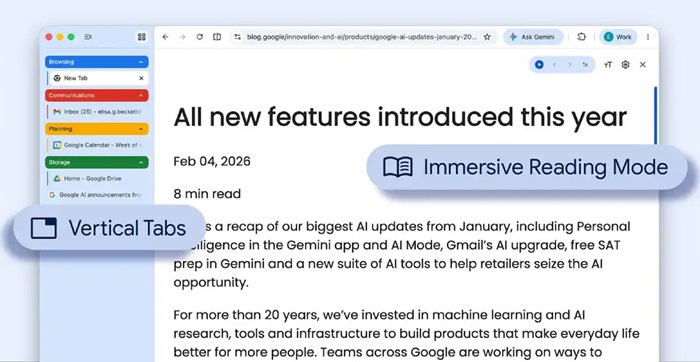
Chrome now offers a vertical tabs layout, allowing users to move tabs from the top to the side of the browser window.
- Can be enabled via right-click → “Show Tabs Vertically”
- Displays full tab titles for easier navigation
- Improves tab management when multiple tabs are open
- Supports better organization alongside tab groups
This feature aligns Chrome with browsers like Microsoft Edge and Mozilla Firefox that already support vertical tabs.
Google has also updated Chrome’s Reading Mode with a full-page interface.
- Accessible via right-click → “Open in reading mode”
- Removes ads and visual clutter
- Converts webpages into a clean, text-focused layout
The feature is aimed at improving readability, especially for long-form content.
These additions are part of Google’s continued efforts to enhance Chrome’s usability. Recent updates include:
- Gemini side panel integration in India
- Split View functionality
- Built-in PDF markup tools
Too many @GoogleChrome tabs open? Try vertical tabs, rolling out now.
Just right-click any Chrome window and select “Show Tabs Vertically” to move your tabs to the side of the browser window, making it easier to read page titles and manage tab groups. pic.twitter.com/DO7ShWl89f
— Google (@Google) April 7, 2026
The new features are rolling out gradually to Chrome users across platforms. Availability may vary based on version and region.

