
Add MobiGyaan as a preferred source on Google
Android has introduced a new experience that allows users to move passwords and passkeys directly between password managers without first downloading them into a file. The feature is available on devices running Android 8 and later.
Previously, transferring passwords could involve exporting them into an unencrypted text file, potentially leaving sensitive credentials exposed on the device. Passkeys also could not be transferred between password managers, meaning users often had to recreate them across websites and apps.
With the new transfer experience, users can move both passwords and passkeys when switching to a different password manager without creating an intermediate file.

How To Transfer Passwords & Passkeys
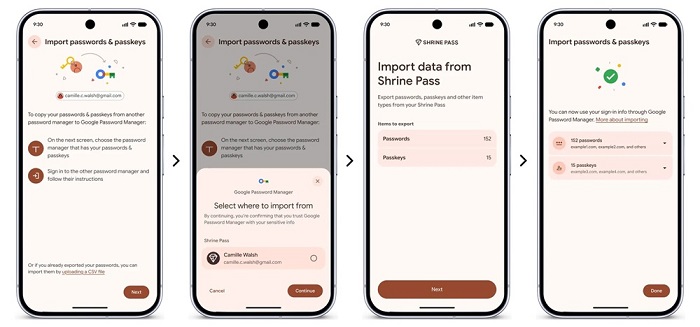
Users can start the process from their new password manager by selecting the option to import or copy passwords and passkeys from another provider. The password manager then hands the transfer process over to Android.
Android automatically detects the password managers installed on the device and displays the providers from which data can be imported. After selecting a provider and tapping Continue, users are taken to their existing password manager to select the passwords and passkeys they want to transfer.
Users can then review and authorize the selected data. Signing in to the existing password manager may be required, while transferring passkeys can require a recovery key.
Once authorized, Android securely transfers the selected data between the apps, with the process completing within a few seconds.
Screen Lock Required For Transfers
A screen lock, such as a PIN, pattern, or fingerprint, is required to import passwords and passkeys on Android. Devices without a screen lock will prompt users to set one up before starting the transfer.
When passwords already stored in Google Password Manager are imported, Android does not add duplicate entries. However, the import may fail if no passwords are found in the other password manager or if the transferred data is corrupted.
For passkeys on a new device, users may need to use the old device’s screen lock or their Google Password Manager PIN to access the passkeys.
Supported Password Managers
The new transfer experience is currently available on:
- Google Password Manager
- 1Password
- Bitwarden Password Manager
- Dashlane
Google says more password manager partners will be supported in the future. The company says the feature is designed to give users greater control over their data and make it easier to switch password manager providers.

