

Add MobiGyaan as a preferred source on Google
WhatsApp now allows users to schedule messages to be sent automatically at a later date and time. This is useful for sending birthday wishes, reminders, announcements, or important messages without having to remember to send them manually. Here’s how to schedule a message on WhatsApp.

How to Schedule a Message on WhatsApp
- Open WhatsApp on your Android or iPhone
- Open the individual or group chat where you want to schedule a message
- Type your message in the chat’s text box
- Long-press the Send button to access the scheduling option
- Select the date and time when you want the message to be delivered
- Confirm the schedule to save the message
WhatsApp will automatically send the scheduled message at the selected time, even if your phone is offline.
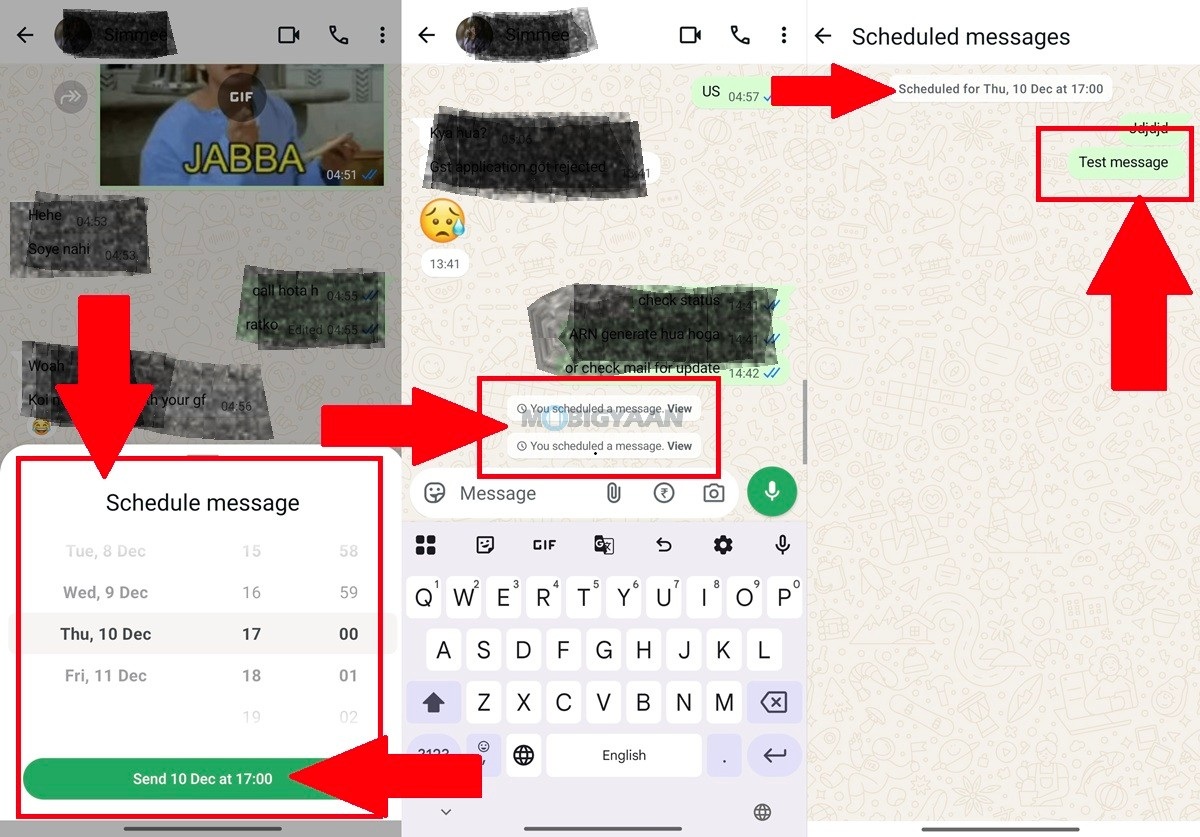
How Far in Advance Can You Schedule WhatsApp Messages?
WhatsApp supports scheduling messages from 10 minutes to up to two weeks in advance. You can schedule text messages, links, photos, and videos.
How to View or Delete Scheduled Messages
You can manage scheduled messages through the chat information section.
- Open the WhatsApp chat where you scheduled the message
- Tap the chat name to open its information page
- Find the scheduled messages section
- Select the message you want to manage
- Delete it if you no longer want it to be sent
Deleting a scheduled message before delivery does not notify the recipient.
Things to Know Before Scheduling Messages
- Scheduled messages remain protected by WhatsApp’s end-to-end encryption
- Messages are delivered automatically at the selected time
- In group chats, delivery is limited to people who are members of the group when the message is scheduled
- The feature is rolling out gradually to Android and iOS users
Note: If you don’t see the scheduling option yet, it may not have reached your account.