
Add MobiGyaan as a preferred source on GoogleWhatsApp has started rolling out parent-managed accounts designed to help families safely introduce messaging to children under 13, or the local minimum age, depending on regional regulations. The new feature allows parents or guardians to supervise their child’s WhatsApp activity while still ensuring that personal conversations remain private and end-to-end encrypted.
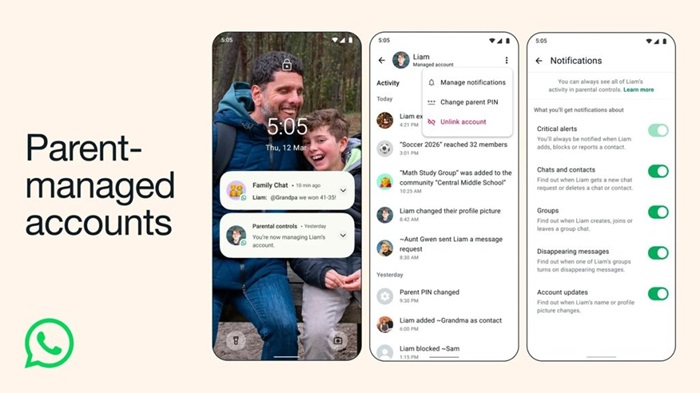
The new parent-managed accounts include several tools aimed at improving child safety and parental oversight.
Parental Controls
Parents can manage their child’s WhatsApp experience by controlling:
- Who their child can contact
- Which groups they can join
- Message requests from unknown users
This allows parents to ensure their child communicates only with approved contacts.
End-to-End Encryption
Despite the added supervision tools, all chats remain end-to-end encrypted, meaning that WhatsApp and third parties cannot read conversations.
Parent PIN Protection
A 6-digit parent PIN is required to access and modify the child’s account settings. This ensures that only parents or guardians can change privacy settings or communication permissions.
Limited App Functionality
Child accounts have restricted features, focusing only on:
- Messaging
- Voice and video calls
Other advanced features are limited to maintain a safer messaging environment for younger users.
How to Set Up a Parent-Managed Account
Requirements
- A parent or guardian aged 18 or older
- The latest version of WhatsApp installed on both the parent’s and child’s devices
Setup Steps
- Install WhatsApp on the child’s phone via the Google Play Store or Apple App Store.
- Open WhatsApp on the child’s device and select More options → Create a parent-managed account.
- Enter the child’s phone number and birthday to verify age eligibility.
- On the parent’s device, open WhatsApp and scan the QR code displayed on the child’s phone.
- Confirm that the parent or guardian is an adult user.
- Create a 6-digit parent PIN to manage the child’s privacy settings.
- Enter the parent PIN on the child’s device to complete the setup.
- The child can then add their name and profile photo.
Depending on local regulations, app stores may share the user’s age range with WhatsApp, which can be reviewed or adjusted in Apple or Google device settings.
Availability
WhatsApp says the parent-managed accounts feature is being rolled out gradually, and availability may vary depending on region and local regulations. The update aims to provide a safer messaging environment for younger users while allowing them to stay connected with family and friends.

