
Add MobiGyaan as a preferred source on Google
Nothing has introduced Nothing OS 5.0, the latest version of its Android-based operating system. Built on Android 17, the update brings a refreshed interface, expanded personalization options, new on-device AI capabilities, improved Glyph controls, and deeper ecosystem features.
The update focuses on three key areas: greater control, deeper personalization, and increased engagement, while continuing Nothing’s minimalist visual approach.

Refreshed Interface & Customization
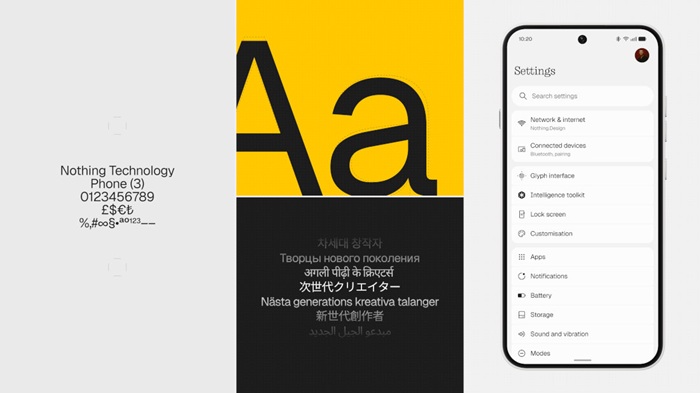
Nothing OS 5.0 introduces several visual changes across the operating system, including the new Geist typeface, standardized corner radiuses, and refined transparency effects across native applications such as Camera, Gallery, and Settings.
The updated theming engine can dynamically sample colors from the user’s wallpaper and apply them to app icons, home screen widgets, and 1×1 Quick Settings tiles.
The lock screen also receives two new clock designs, Gooey and Micrographics, with customizable color options.
Nothing is adding new widgets, including Collector, which organizes photographed items into visual showcases, and Away Time, which tracks time spent away from the phone and displays weekly usage habits.
The home screen now supports batch editing, allowing users to move multiple app icons and widgets simultaneously.
New Glyph Hub
Nothing’s signature rear Glyph interface is now managed through a dedicated Glyph Hub app.
The app brings together sound profiles, ringtones, schedules, and other Glyph-related controls. Nothing is also introducing a dedicated Glyph Timer widget for easier access to timer functionality.
AI Utilities & Essential Features
Nothing OS 5.0 expands the company’s Essential feature suite with several new AI-powered tools.
Essential Voice now provides improved speech-to-text processing with real-time transcription and better structural formatting for lists and notes. It also supports SuperMic, allowing users to capture audio directly through the Nothing Ear (3) charging case.
Essential Space gains Smart Collections, which can automatically organize saved memories and information. The feature also adds unified Essential Key shortcuts and Model Context Protocol (MCP) compatibility, allowing supported third-party AI tools to query permitted local data.
Another new addition is Essential Apps Builder, an on-device tool that can generate lightweight AI-powered applications from natural-language prompts without requiring users to write code.
Android 17 Features & System Improvements
Nothing OS 5.0 also incorporates several changes based on Android 17.
The notification and Quick Settings interface now uses a split swipe system, with users swiping down from the left side for Notifications and from the right side for Quick Settings.
Nothing is also introducing cross-platform Quick Share, allowing files to be exchanged between compatible Android and iOS devices using QR-code scanning.
Performance improvements include smarter resource prioritization, predictive app-launch caching, and scheduled overnight memory maintenance.
The update also adds real-time indicators showing when the camera, microphone, or location sensors are being accessed, along with independent Assistant volume controls.
Other additions include Noto 3D emojis and fixed-frame QR-code detection in the camera app.
Nothing OS 5.0 Rollout
The Nothing OS 5.0 Open Beta program will begin on 26th August 2026 at 3:30 PM IST, initially for the Nothing Phone (3).
Support for additional compatible Nothing smartphones is expected to follow in subsequent rollout phases. Nothing is yet to announce the stable release timeline for each supported device.

