
Add MobiGyaan as a preferred source on GoogleSpotify has introduced a redesigned tablet app experience, bringing an adaptive interface and improved multitasking capabilities to larger screens. The update is aimed at making music discovery, playback, and video consumption more intuitive, while aligning the tablet experience closer to mobile.
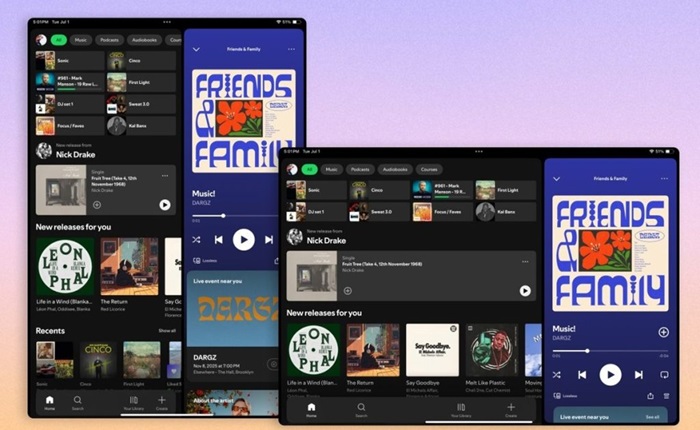
Unlike earlier versions that simply scaled the mobile UI, the new tablet interface is:
- Optimized for large displays
- Designed to enable browsing alongside playback
- Aligned with mobile UI for consistent experience across devices
One of the key highlights is the dynamic layout system:
- Automatically adjusts between portrait and landscape modes
- Reorganizes content for balanced viewing
- Allows users to browse while music or video continues playing
Spotify has introduced a new sidebar navigation system:
- Expandable for deeper browsing
- Collapsible for a cleaner UI
- Includes interactive and scrollable discovery sections
The update also enhances video consumption:
- More prominent “Switch to Video” toggle
- Easier transition from audio to video content
- Better integration of video within the browsing experience
Spotify retains its core navigation structure:
- Bottom navigation bar for key sections
- Side drawer for profile and settings
Nicole Burrow, Head of Design, Consumer Experience, Spotify, said, “From TV to desktop to the car, we’ve been designing Spotify to feel native to each screen – and now we’re extending that same experience to tablets. Tablets give you more room to explore, so we designed it to let you browse and discover new favorites alongside what’s already playing. The goal was simple: Wherever you open Spotify, it should feel unmistakably like Spotify.”
The redesigned tablet experience is rolling out to Android tablets and iPads. The update is being deployed in a phased rollout

